Your link, QR code and share kit
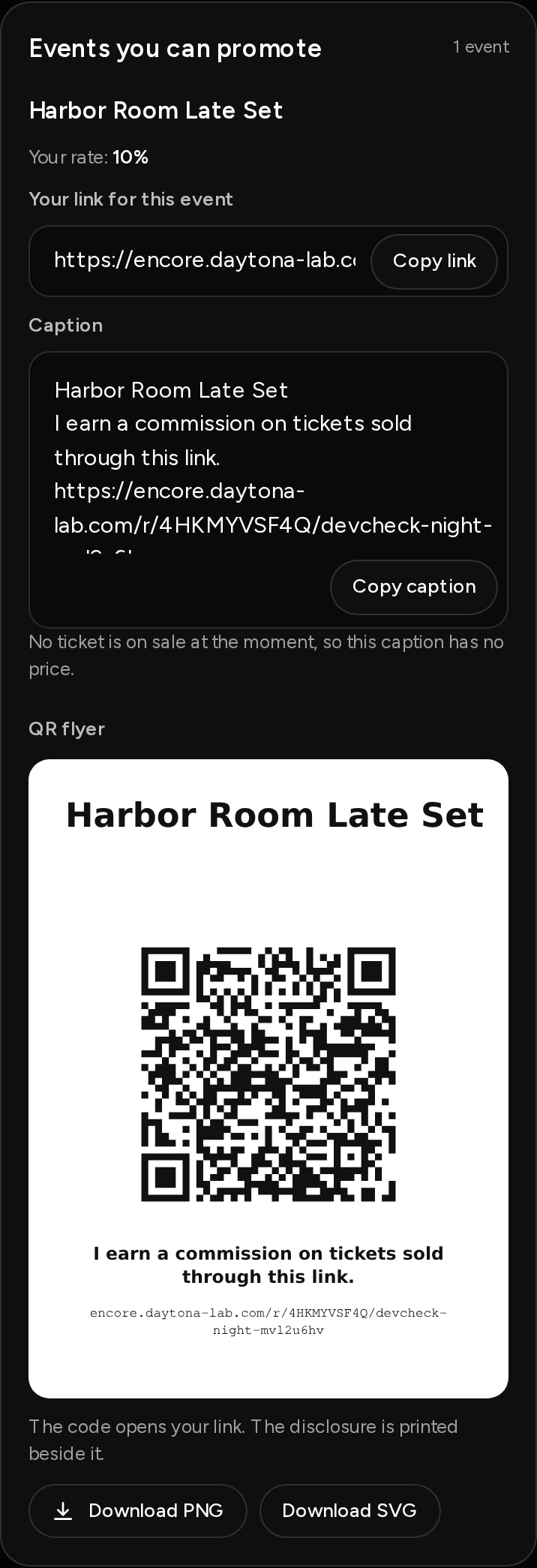
Every event you can promote has its own link, a ready-to-post caption and a QR flyer, all on your Promote page.
Your links
- Your link for this event goes straight to that event. Use it when you can.
- Link to all of their events goes to the organizer's page. Sales only count for events listed under Events you can promote.
Tap Copy link to copy either one.
The caption
Each event has a Caption ready to post. It has the event name, the starting price with fees included, the line "I earn a commission on tickets sold through this link." and your link. Tap Copy caption.
You can't edit the price in the caption, and the disclosure line stays in. If no paid ticket is on sale, the caption says "No ticket is on sale at the moment, so this caption has no price."
The QR flyer
The QR flyer opens your link when scanned. The disclosure is printed under the code, with your link beneath it. Tap Download PNG for phones and posts, or Download SVG for print.
Your numbers
At the top you'll see Link visits, Tickets and Earned commission. Sales through your links lists each sale with its commission and status. You never see who bought.
If you see Link paused, the organizer paused your link. Sales aren't credited until they turn it back on.