Door PIN for one-night staff
A door pass lets someone scan tickets for one event without making an account. You give them a link and a 6-digit PIN.
Who can make one: owners and admins. A pass works for one event only.
When to make it
A pass lasts 24 hours from the moment you make it, or until the door closes, whichever comes first. The door closes 6 hours after your event's end time (18 hours after the start, if the event has no end time). So make the pass on the day, not the week before. The card tells you: "Works until" a time.
Make a door pass
- Go to Door and pick the event.
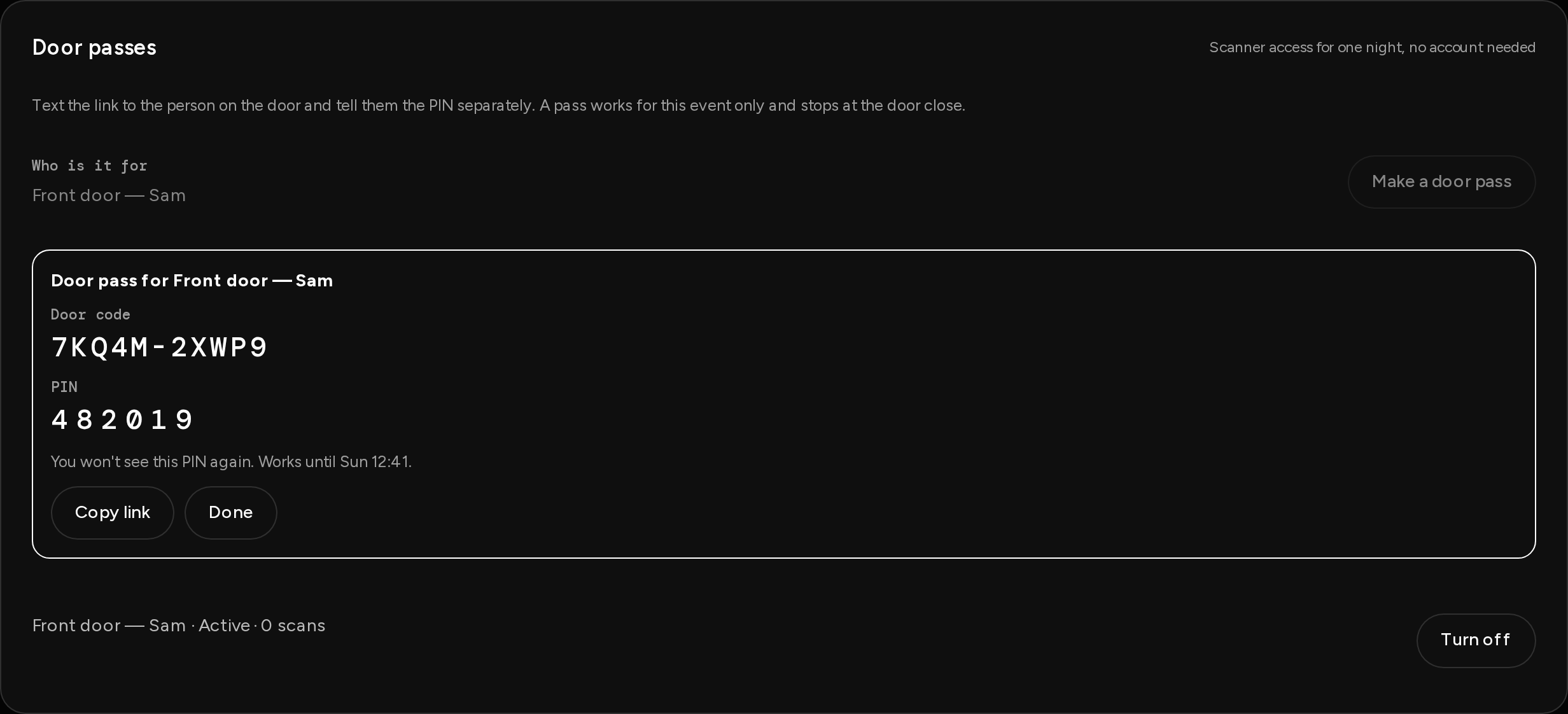
- Under Door passes, type Who is it for, like "Front door — Sam".
- Tap Make a door pass.
- You see a Door code and a PIN. Write the PIN down now. You won't see it again.
- Tap Copy link and text the link to your helper. Tell them the PIN separately, by phone or in person.
What your helper does
- Opens the link on their phone. The page says Scan tickets at the door.
- Checks the Door code and types the PIN.
- Taps Start scanning.
Turn a pass off
In the list under Door passes, tap Turn off next to the pass. It stops working right away. Each pass shows its state (Active, Expired, Turned off) and how many scans it has made.
Good to know
- After 5 wrong PINs the pass locks. The list says Locked after 5 wrong PINs. Make a new one.
- A door pass can't scan with no signal. Offline mode needs a signed-in team member. If your venue has poor signal, add the person as door staff in Settings → Team instead.
- A door pass can't open your dashboard, see money or refund anyone.